
Learn how to quickly register your ZAGG screen protector or case to activate the limited lifetime warranty. Ensure your device is protected and eligible for hassle-free replacements.
In today's world, where our mobile devices are indispensable, protecting them is paramount. ZAGG offers a range of protective solutions, from screen protectors to cases, designed to keep your devices safe from the rigors of daily life. However, simply purchasing a ZAGG product isn't enough.
To fully benefit from their protection and warranty programs, registering your product is essential. This comprehensive guide will walk you through the ZAGG product registration process and help you understand the ins and outs of their warranty policies.
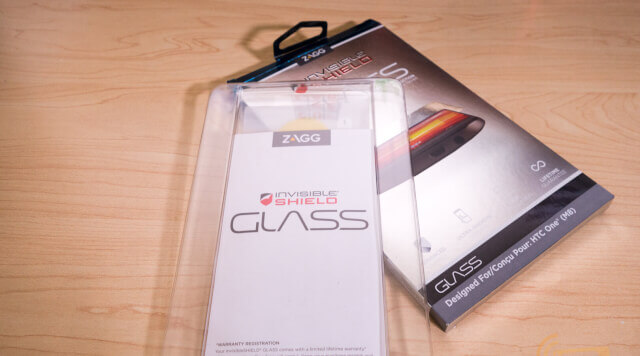

Why Register Your ZAGG Product?
Registering your ZAGG product unlocks a multitude of benefits, including:
- Warranty Activation: Registration is often a prerequisite for activating your ZAGG product's warranty. This ensures that you're covered in case of defects or damage covered by the warranty policy.
- Easy Warranty Claims: When the time comes to make a warranty claim, having your product already registered streamlines the process. Your product information is readily available, saving you time and hassle.
- Access to Support: Registering your product may grant you access to ZAGG's customer support channels, where you can get assistance with troubleshooting, product information, and warranty inquiries.
- Exclusive Offers and Updates: ZAGG may offer exclusive deals, discounts, and product updates to registered users, enhancing your overall experience.
How to Register Your ZAGG Product
ZAGG offers a straightforward online registration process. Here's a step-by-step guide:
- Visit the ZAGG Website: Go to ZAGG's website (ZAGG.com).
- Create an Account or Log In: If you don't have an account, create one. If you already have one, log in. Creating an account allows you to keep track of your purchases and registered products.
- Navigate to Product Registration: Look for a Support or Registration section on the website. There's usually a clear link to Register a Product.
- Enter Product Information: You'll be prompted to enter details about your ZAGG product, such as the product name, model number, and purchase date. Having your receipt handy will make this easier.
- Provide Proof of Purchase: You may need to upload a copy of your purchase receipt as proof of purchase.
- Complete the Registration: Review all the information you've entered and submit the registration form. You should receive a confirmation email upon successful registration.
Automatic Registration: If you purchased your ZAGG product directly from ZAGG.com while logged into your account, your product may be automatically registered.
QR Code Registration: If you have the product box, you can scan the QR code for automatic registration.
Understanding ZAGG Warranty Policies
ZAGG offers warranties on its products, but it's crucial to understand the terms and conditions. Here are some key aspects of ZAGG warranty policies:
- Warranty Period: The duration of the warranty varies depending on the product. Some products may have a limited lifetime warranty, while others have a one-year, two-year, or three-year manufacturer's warranty.
- Coverage: The warranty typically covers defects in materials and workmanship. It may not cover damages caused by normal wear and tear, misuse, or unauthorized modifications.
- Registration Requirement: As mentioned earlier, product registration is often required to make a warranty claim.
- Proof of Purchase: You'll need to provide proof of purchase, such as a receipt, to validate your warranty claim.
- Warranty Claim Process: To make a warranty claim, you'll typically need to visit the ZAGG website, log in to your account, and follow the instructions for submitting a claim. You may need to provide photos of the damaged product.
- Replacement or Exchange: If your warranty claim is approved, ZAGG may either replace the product or exchange it with a product of equal value. In some cases, they may offer a refurbished product as a replacement.
- Shipping and Handling Fees: You may be responsible for shipping and handling fees associated with warranty replacements.
Specific ZAGG Products and Warranties
- InvisibleShield: To make a warranty claim for InvisibleShield products, registration at ZAGG.com is necessary. A valid credit card might be required, and returning the damaged product could also be a requirement.
- ZAGG Defense+: For ZAGG Defense+, registration is needed within 30 days of purchase to lock in the screen repair guarantee.
- Liquid Defense+: For Liquid Defense+, you are required to certify your guarantee within 30 days of purchase.
Tips for a Smooth Registration and Warranty Experience
- Register Immediately: Don't delay registering your ZAGG product. Do it as soon as you purchase the product to ensure you don't miss any deadlines.
- Keep Your Receipt: Store your purchase receipt in a safe place, as you'll need it for registration and warranty claims.
- Read the Warranty Policy: Familiarize yourself with the specific warranty policy for your product to understand the coverage and limitations.
- Take Photos of Damage: If you need to make a warranty claim, take clear photos of the damage to support your claim.
- Contact Customer Support: If you have any questions or issues during the registration or warranty claim process, don't hesitate to contact ZAGG's customer support for assistance.
Troubleshooting Common Registration Issues
- Serial Number Not Found: Some ZAGG products, like the InvisibleShield, may not have a serial number. In this case, there's usually an option to skip or select I don't know during registration.
- Website Issues: If you encounter website errors during registration, try clearing your browser's cache and cookies or using a different browser.
- Account Problems: If you're having trouble logging into your ZAGG account, use the Forgot My Password option to reset your password. Also, ensure you are on the correct website for your country or region.
Conclusion
Registering your ZAGG product is a simple yet crucial step in ensuring its long-term protection and maximizing the benefits of the warranty. By following this guide and understanding ZAGG's warranty policies, you can safeguard your mobile devices and enjoy peace of mind knowing you're covered in case of the unexpected.
Disclaimer: Warranty policies and procedures can change. Always refer to the official ZAGG website for the most up-to-date information.
Related Posts
2023 How To Replace Your InvisibleShield Under ZAGG Warranty
Why do we need to do the ZAGG register One reason to register ZAGG's products is that they offer a lifetime warranty. By writing the product online, the customer can request replacements for the screen protector if it becomes damaged or malfunctions at any time. This means that instead of paying the total price for
How Do I Register My Product On www.Zagg.com/Register
Zagg offers the highest quality screen protectors for both Android and iPhone devices. In addition to its renowned screen protectors, the company specializes in other electronic accessories. To register your product with Zagg, follow the step-by-step by this post. How do I register my Zagg Product on ZAGG Care You need to visit the zagg.com/register
Register Your ZAGG Product Online
If you've recently purchased a Zagg or InvisibleShield product, you can easily register it on the Zagg website. Go to www.zagg.com/register and follow simple steps to register your product's warranty claims online. To get started, open the registration website in your web browser. If you already have a Zagg.com account, sign in with your username
Notice: Internet users spontaneously contributed the article content, and the article views only represent the author himself. This site only provides storage services, does not have ownership, and bears relevant legal liabilities. If you find plagiarism, infringement, or illegal content, please contact the administrator to delete it.